This option will create an ILR Output file for the learning types specified. You can create partial ILR return output files containing different combinations of learning types to output and validate (and if required, return to the SFA) a subset of the ILR records for Funding Year 2017/18 onwards.
The data processing settings which have been set are not applied to the output process, which only uses the selected funding year in the ribbon.
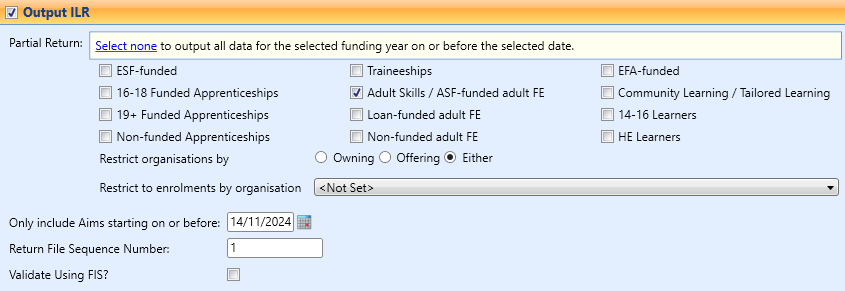
You can select any combination of learning types for inclusion in the output file. Selecting the Select none link will output all data for the selected funding year (that is: selecting this link will deselect all learning types if any are selected).
The Restrict Organisations field enables you to select to restrict the output of ILR records by owning or offering organisations set in Curriculum.
The Restrict to enrolments by organisation field enables you to select an organisation unit to process data for a specific organisation only and restrict the output of ILR records to those that are linked to enrolments on courses.
The Only include Aims starting on or before enables you to restrict the output of ILR records to only include aim records from the date set. By default this date is the current system date.
The Return file Sequence Number to be used in the output file name and header/footer is specified in the field below. This will default to the last-used number but can be changed where required.
The Validate Using FIS? check box enables you to automatically send the return file to the FIS application to be validated. If this is set and the output is run, a FIS command prompt will display where you can see the progress of the output being validated.